If your NetSuite account has been customised over the years, SuiteScript is almost certainly running behind the scenes. It drives approval logic, field defaulting, custom buttons, scheduled jobs, RESTlet integrations and much more.
With the 2026.2 release, Oracle made SuiteScript 2.1 the standard scripting model for new and existing scripts. It also announced that SuiteScript 1.0, SuiteScript 2.0 and the @NApiVersion 2.x annotation will be phased out over the next few releases. By 2028.2, every script must use SuiteScript 2.1, and legacy script versions will no longer run.
That can sound a long way off. But many accounts carry a large number of scripts, written by different developers over many years, often with little documentation. Before any code is changed, someone has to work out what each script does, whether it is still needed and how to prove it still works afterwards. In this article we cover what is changing, the technical differences that catch scripts out, and a practical plan to get your account ready.
/ What is changing?
Oracle is phasing out SuiteScript 1.0, SuiteScript 2.0 and 2.x over several releases. The change affects all SuiteScript 1.0 scripts and any script annotated @NApiVersion 2.0 or @NApiVersion 2.x. Oracle's published milestones are:
| NetSuite release | What happens |
|---|---|
| 2026.2 | SuiteScript 2.1 becomes the standard scripting model for new and existing scripts. |
| 2027.1 | SuiteScript 1.0 enters end-of-life support, covering critical issues only. For other problems, Oracle will ask you to convert the script to 2.1 first. |
| 2028.1 | SuiteScript 1.0 scripts can no longer be deployed in new accounts (existing accounts can still deploy them). SuiteScript 2.0/2.x scripts run as SuiteScript 2.1 by default. |
| 2028.2 | All new and existing scripts must use SuiteScript 2.1. Legacy script versions will no longer run. |
Oracle's stated reasons are better performance, stronger security and alignment with modern JavaScript. In practice, 2.1 runs server scripts on a newer engine that follows ECMAScript 2023, so you can use let, const, arrow functions, spread operators and async/await (in supported modules). The older 2.0 runtime targets ECMAScript 5.1.
/ Under the hood: what actually changes in your code
SuiteScript 2.0 and 2.x: same API, different engine
For 2.0 and 2.x scripts, the N/ modules stay the same. The headline change is one line: set the JSDoc tag to @NApiVersion 2.1. The catch is that 2.1 uses a different runtime engine, and Oracle documents a number of behaviours that change as a result. Some cause an immediate error; others quietly change results, which is harder to spot.
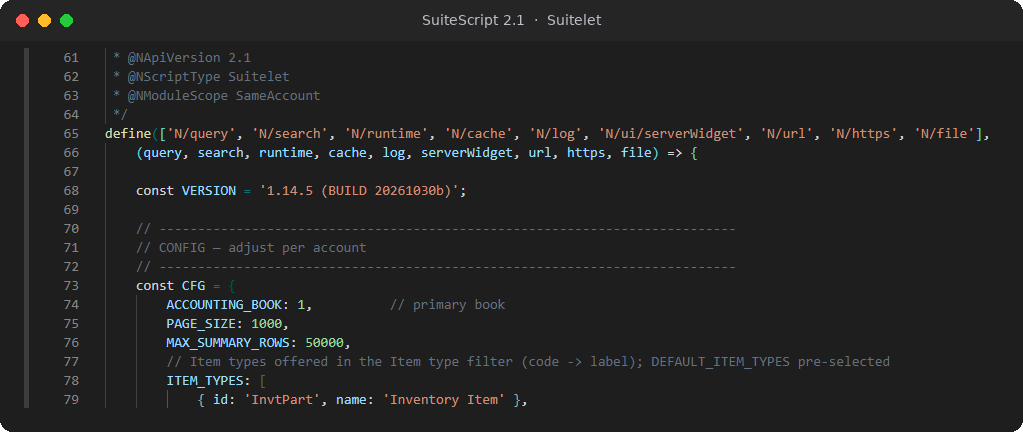
@NApiVersion 2.1 tag, an arrow function in define(), and const declarations. Modern JavaScript like this runs on the 2.1 engine.| Area | SuiteScript 2.0 | SuiteScript 2.1 |
|---|---|---|
Reserved words (e.g. extends) used as names | Accepted | Syntax error |
Assigning a variable with no var, let or const | Tolerated | ReferenceError |
Reassigning a const | Silently ignored | TypeError stops the script |
for each...in loops and conditional catch (e if ...) | Accepted | Syntax error |
toSource() | Available | Error |
JSON.parse with trailing commas | Accepted | Error |
JSON.stringify(new Error('...')) | Includes the message | Returns {} |
parseInt('08') | No value | Returns 8 |
toLocaleDateString() default | Long format (December 21, 2012) | Short format (2012-12-21) |
record.setValue() with 616.00 | Stores 616.0 | Stores 616 |
RESTlet post() returning a string | JSON.stringify applied automatically | Not applied |
RESTlet returning JSON (application/json) | Arrives as a string | Arrives as an object |
| Debugging | SuiteScript Debugger | Browser debugger (Chrome DevTools) |
SuiteScript 1.0: a rewrite, not a version change
SuiteScript 1.0 uses global nlapi* functions and nlobj* objects. SuiteScript 2.1 is modular, so a 1.0 script has to be restructured and rewritten, not just re-tagged. Converting a script typically involves:
- Adding the JSDoc tags (
@NApiVersion 2.1,@NScriptType), adefine()call and a return statement - Replacing each 1.0 call with the matching N/ module method, for example
nlapiLoadRecordbecomesrecord.load() - Passing a single options object instead of individual arguments
- Updating entry points, which now receive a
contextobject (for example,nlapiGetNewRecord()becomescontext.newRecordin a user event script) - Watching for index changes: in client scripts, 1.0 line numbers start at 1, while 2.1 lines start at 0
- Replacing 1.0 functions with no direct 2.1 equivalent, such as
nlapiAddDaysandnlapiAddMonths, with standard JavaScript or another NetSuite approach
Once the code is converted, the existing script record is pointed at the new file, and NetSuite updates its API version to 2.1. The converted file must keep the same script type as the original record.
/ What this means for your scripts
The work, and the deadline that matters most, depends on which version each script uses.
| Script version | Key milestone | What it needs | Typical effort |
|---|---|---|---|
| SuiteScript 1.0 | Critical-issue support only from 2027.1; stops running in 2028.2 | A rewrite to 2.1 | High: new structure, APIs and entry points |
@NApiVersion 2.0 | Runs as 2.1 by default from 2028.1 | Re-tag to 2.1, fix incompatibilities, retest | Low to medium |
@NApiVersion 2.x | Runs as 2.1 by default from 2028.1 | Re-tag to 2.1, fix incompatibilities, retest | Low to medium |
@NApiVersion 2.1 | None | Nothing for this change | None |
A few points are easy to miss:
- 2028.1 is the real deadline for 2.0/2.x scripts. From that release they run on the 2.1 engine whether or not anyone has touched them. Any incompatibility will surface then, in production, rather than at a time you choose.
- The API Version field is only a starting point. Oracle notes that you still need to review each script's source and dependencies to know whether code changes are required.
- Some features still have their own version rules. Where a feature's documentation requires an older SuiteScript version, Oracle says to follow that requirement until the help content is updated.
- Scripts from SuiteApps and bundles. If scripts in your account came with a third-party SuiteApp or bundle, ask the provider about their plan for SuiteScript 2.1.
/ Why it matters
Scripts usually sit on the processes a business can least afford to stop: order entry, invoicing, approvals, fulfilment and the integrations that connect NetSuite to everything else. Leaving the transition to the last release cycle creates three risks:
- Silent changes in 2028.1. When 2.0/2.x scripts start running as 2.1 by default, a script can begin producing different numbers, dates or API responses without anyone editing it.
- Reduced support from 2027.1. Once SuiteScript 1.0 is in end-of-life support, a non-critical issue with a 1.0 script will need converting before Oracle will look at it.
- A compressed timeline. Every NetSuite account has to make this change by the same deadline, so experienced SuiteScript developers will be in high demand as 2028 approaches.
Common scripts at risk
- User event scripts on transactions and records that set values, validate data or create related records
- Client scripts on forms, especially those that work with sublist line numbers or dates
- Scheduled and map/reduce scripts that process data in bulk overnight
- RESTlets and Suitelets used by integrations, portals and custom pages, where response formats can change
- Workflow action and mass update scripts that extend standard workflows and bulk updates
- Bundle installation scripts and older customisations no one has looked at in years
/ Getting started
Oracle's guidance and our own experience point to the same five steps.
- Inventory every script not on 2.1. Go to Customization > Scripting > Scripts and filter by API Version. For a reusable list, create a saved search on script records with the criterion API Version is not 2.1, and include Name, ID, Script Type, API Version, Owner and Description. A SuiteAnalytics workbook grouped by API version or script type works too.
- Triage before you touch any code. Oracle recommends evaluating inactive, obsolete or duplicated scripts for retirement instead of migration. Rank the rest by business impact, and start the conversion work with a few low-complexity scripts so the team learns the process.
- Test 2.0/2.x server scripts in the 2.1 runtime first. In a sandbox, go to Setup > Company > Preferences > General Preferences and enable Execute SuiteScript 2.0 Server Scripts as 2.1 and Execute SuiteScript 2.x Server Scripts as 2.1. Existing scripts then run on the 2.1 engine without code changes. Scripts that fail validation keep running as 2.0, and you can switch the preferences back at any time. These preferences cover server scripts only.
- Convert, then review every line. Re-tag 2.0/2.x scripts and fix anything that breaks; rewrite 1.0 scripts. Oracle's SuiteScript Upgrade agent skill and the SuiteCloud Developer Assistant can speed up analysis and conversion. Oracle is clear that you must review all generated code, and that validation "is a static migration check, not a substitute for functional testing."
- Validate and roll out in phases. Test every entry point, plus sublists, searches, record operations, data handling and error handling. Confirm that deployment records and SDF objects still reference the correct files, and compare the results with the original script. Then move scripts to production in manageable groups and monitor execution logs before starting the next group.
/ How IBT can help
Converting code is only part of the job. The bigger effort is understanding what is in your account and proving the new scripts behave the way the business expects. The IBT Cloud ERP team can take you through the whole process.
/ Final Thought
The SuiteScript 2.1 transition is not optional, and for 2.0/2.x scripts the practical deadline is 2028.1, not 2028.2. The upside is that it is a rare chance to clean up an account: retire what you no longer need, document what you keep, and move onto a modern, supported platform. Starting now means you can work through it in planned stages, rather than rushing to fix scripts as the deadline closes in.
Need help getting started?
Talk to the team at IBT about getting your NetSuite scripts ready for SuiteScript 2.1.
Talk to IBT