Acronyms seem to be everywhere lately, but are not always easy to understand. What do they mean? How do they affect your organisation? And where do you start if you do not want to be left behind?
Before we get into the detail, it helps to start with three simple building blocks.
That overlap is where things become interesting. NetSuite, as an ERP platform, is increasingly using AI to make business information easier to access, interpret, and act on — and specifically, an LLM is what sits behind the "AI" in these tools, doing the work of understanding a plain-English question and turning it into something NetSuite can act on. Over the coming weeks, we will be unpacking these topics one by one through plain-English explanations, practical examples, and real-life business scenarios.
In this post — Part 1 — we cover the concepts: NetSuite's MCP Standard Tools SuiteApp and the NetSuite AI Connector Service — what they are, why they matter, and how they could change the way organisations interact with ERP data. In Part 2, we will put it into practice, with real examples of Claude querying NetSuite data, downloading and installing skills, and the current limitations to be aware of.
/ What is NetSuite's MCP?
MCP stands for Model Context Protocol. It is an emerging standard for how AI systems communicate with external applications, data sources, and business tools. In the NetSuite context, MCP provides a structured way for an AI client to discover available tools, request information, and execute approved actions through NetSuite's existing security model.
The NetSuite AI Connector Service acts as the bridge between an AI client and NetSuite. Rather than giving an AI system unrestricted access to the ERP database, interactions are routed through defined tools, roles, permissions, and controls.
/ A Library Analogy
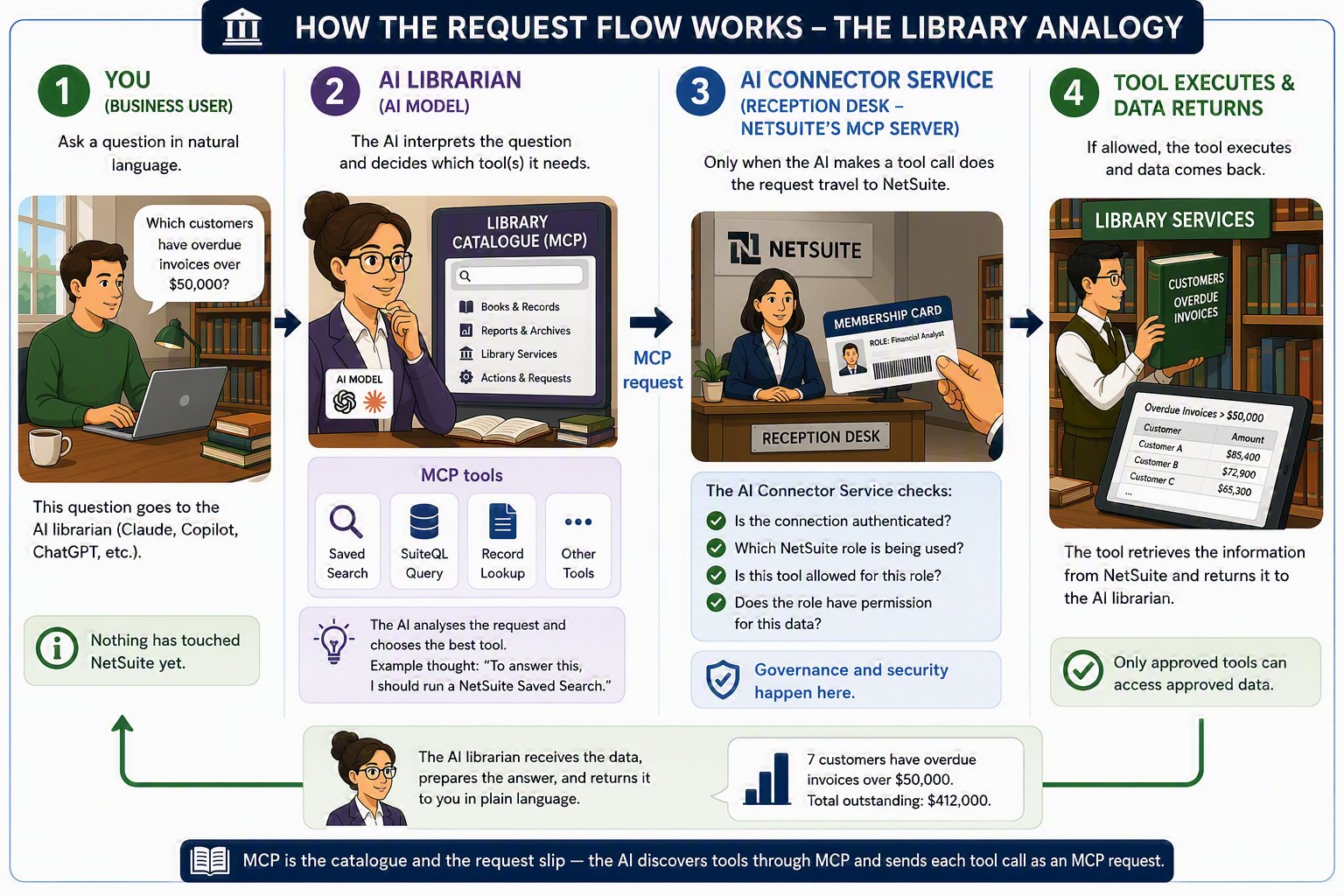
To make sense of the moving parts — the AI model, MCP, tools, skills, permissions — imagine your NetSuite environment as a large corporate library. Each component of the architecture has a clear counterpart.
The AI model: the librarian
The AI model — Claude or ChatGPT — is the librarian. Highly intelligent, fluent in natural language, able to interpret a question such as:
"Which customers have overdue invoices?"
But the librarian does not automatically have access to every book in the library, and by itself has no knowledge of your NetSuite account. Importantly, you never walk the shelves yourself — you talk to your librarian, and the librarian visits the library on your behalf, carrying your membership card.
MCP: the library catalogue
The Model Context Protocol acts like the library's catalogue system. Rather than letting the librarian wander every shelf, the catalogue provides a structured way to discover what information is available and how to retrieve it — what books exist, where they are located, and which requests can be made.
The AI Connector Service: the reception desk
The reception desk sits at the entrance to the library itself — not at the entrance to your conversation with the librarian. You ask your question directly to the librarian, and nothing beyond that conversation happens until the librarian decides which service to request and walks up to the desk on your behalf. Each time they do, the receptionist checks your membership card: who is asking, whether they have permission, and whether the requested action is allowed. The receptionist does not provide the information themselves — they ensure requests are routed correctly and securely, and they check the card on every visit, not just the first.
This is also where the earlier distinction between the Connector Service and the Standard Tools SuiteApp becomes easy to picture. The Connector Service is the reception desk itself — it would exist and keep checking membership cards regardless of what's on the shelves. The NetSuite MCP Standard Tools SuiteApp is the particular set of books NetSuite ships onto those shelves by default. The two are usually experienced as one thing precisely because you rarely visit a reception desk with no library behind it.
NetSuite tools: the books and reference services
The tools exposed through MCP are the actual services available within the library:
| NetSuite Tool | Library Equivalent |
|---|---|
| Saved Search | Looking up a reference book |
| SuiteQL Query | Performing detailed research |
| Record Retrieval | Borrowing a specific book |
| Record Creation | Filing a new document |
| Record Update | Revising an existing document |
At this point the librarian has everything they need to reach the information: a catalogue, a reception desk, and a full set of library services. But access alone does not make someone good at their job. Knowing that a tool exists is not the same as knowing when to use it, in what order, or how to interpret what comes back. That expertise is a separate layer of the architecture — and it is the one most introductions to NetSuite's MCP leave out.
/ Where Skills Fit into the Architecture
A common misconception is that MCP alone makes an AI assistant "understand NetSuite." In reality, MCP provides access to tools and data, while skills provide the instructions and domain knowledge that help the AI use those tools effectively.
In the library, skills are the librarian's training and operating procedures. Imagine two librarians with access to the exact same catalogue and books. One has extensive training and understands where information is typically stored, which references are most reliable, and which process should be followed. The other simply knows how to search the catalogue. Both can access the same library — but the trained librarian will provide faster, more accurate, and more useful answers.
entity field — enough for the AI to write JOIN customer e ON e.id = t.entity correctly without guessing. But that knowledge is generic: it only covers standard, out-of-the-box tables and fields, because a skill NetSuite ships to every account has no way of knowing what your account added. It won't know that customrecord_service_contract exists, or that custrecord_contract_renewal_date means the date a service contract needs to be renewed — that mapping lives only in your account, so it can only exist in a skill your own organisation writes. Skills don't grant any access; they make the access the AI already has far more effective.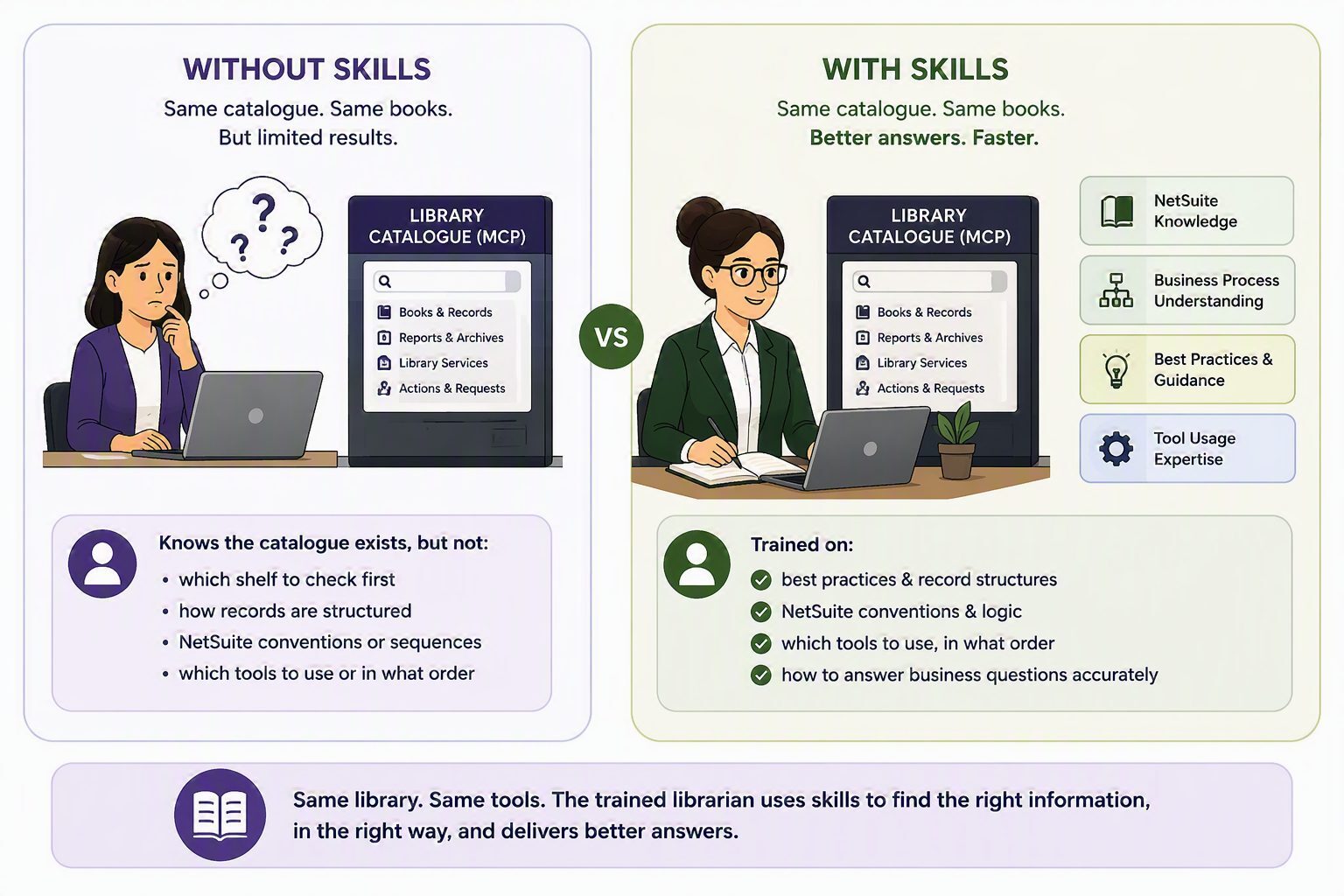
Skills provide NetSuite-specific knowledge, business process guidance, best practices, development patterns, and context about how tools should be used. NetSuite's SuiteCloud Agent Skills, for example, include guidance for SuiteScript development, SDF project management, SuiteCloud CLI usage, NetSuite record structures, and AI Connector implementation.
Organisations are not limited to NetSuite's standard skills either. A finance skill might teach an assistant how to analyse overdue receivables; an inventory skill might explain replenishment data; a custom organisational skill could capture company-specific naming conventions, approval rules, or reporting standards.
A simple way to remember it
| Component | Library Role | What it answers |
|---|---|---|
| AI Model | The librarian | "What is being asked?" |
| Skills | The librarian's training | "How should I answer it?" |
| MCP | The catalogue & request slip | "What services are available, and how do I request them?" |
| AI Connector Service | The reception desk | "Is this request allowed?" |
| NetSuite Tools | Books & reference services | "Do the work." |
| Permissions | Membership cards | "What may this person see?" |
/ Security and Governance Are the Real Differentiators
The most important feature of NetSuite MCP is not simply that it connects AI to ERP data. It is that the connection works through NetSuite's existing roles, permissions, and access controls.
Think of roles and permissions as library membership cards. Different membership levels provide access to different resources — and the librarian cannot ignore these restrictions. Even if someone asks for a restricted document, the receptionist checks their membership before allowing access.
That said, organisations still need to treat AI-enabled ERP access with care. Before enabling MCP, teams should review which roles have connection permissions, define whether AI clients can create or update records, monitor usage, and establish clear controls for sensitive data. Human review remains essential for decisions involving payments, journals, approvals, compliance, or customer commitments.
/ Why It Matters
The practical promise of NetSuite MCP is simple: reduce the friction between people and business data. Instead of waiting for a report to be built, searching through saved searches, or asking an administrator to extract information, a user could ask an AI assistant a business question and receive an answer based on live NetSuite data, subject to their permissions.
- Finance teams — faster access to overdue invoices, budget variances, vendor balances, approval bottlenecks, and cash flow indicators.
- Operations teams — quicker analysis of inventory, order status, fulfilment exceptions, and customer activity.
- Technology teams — a reusable integration pattern rather than one-off connectors for every AI use case.
Common use cases
- Conversational reporting: "What are our top overdue customer balances this month?" answered from live data.
- Saved search access: run approved saved searches without navigating the NetSuite interface.
- Transaction support: create or update records where permissions allow — draft purchase orders, vendor updates, follow-up tasks.
- Variance and exception analysis: identify anomalies, missing approvals, or unusual transaction patterns.
- Process assistance: guide users through workflows by combining NetSuite data with natural language explanations.
/ What This Means for ERP Teams
NetSuite's MCP capability does not remove the need for ERP design, data governance, or process discipline. In fact, it makes those foundations more important. AI is only useful if the underlying data, roles, records, and workflows are reliable. Poorly structured saved searches, inconsistent master data, or overly broad permissions will become more visible when AI starts answering questions on behalf of the system.
A sensible adoption path is to start small: enable read-only or low-risk use cases first, then expand into controlled workflows, custom tools, and more advanced automation once confidence, governance, and auditability are established.
/ Getting Started
- Clarify the business problem. Identify the questions or workflows where conversational access to NetSuite would save time or improve decision-making.
- Review roles and permissions. Confirm which users may connect AI clients and what actions they should perform.
- Start with governed read access. Use reporting, saved searches, and SuiteQL-style analysis before enabling create or update actions.
- Define approval boundaries. Decide where AI can assist, where it can recommend, and where a human must approve.
- Monitor and refine. Review outputs, audit usage, and improve prompts, searches, permissions, and skills over time.
/ Final Thought
NetSuite's MCP is best understood as a bridge between enterprise AI and governed ERP data. In library terms: MCP provides the catalogue, the AI Connector Service provides controlled access, tools provide the functionality, skills provide the expertise, and NetSuite permissions provide the governance.
The opportunity is not just to make NetSuite easier to query; it is to make ERP interactions faster, more contextual, and more useful for the people who depend on them every day.